Claude Code vs Cline: Which AI Coding Agent Should Developers Use in 2026?
Claude Code vs Cline: Which AI Coding Agent Should Developers Use in 2026?
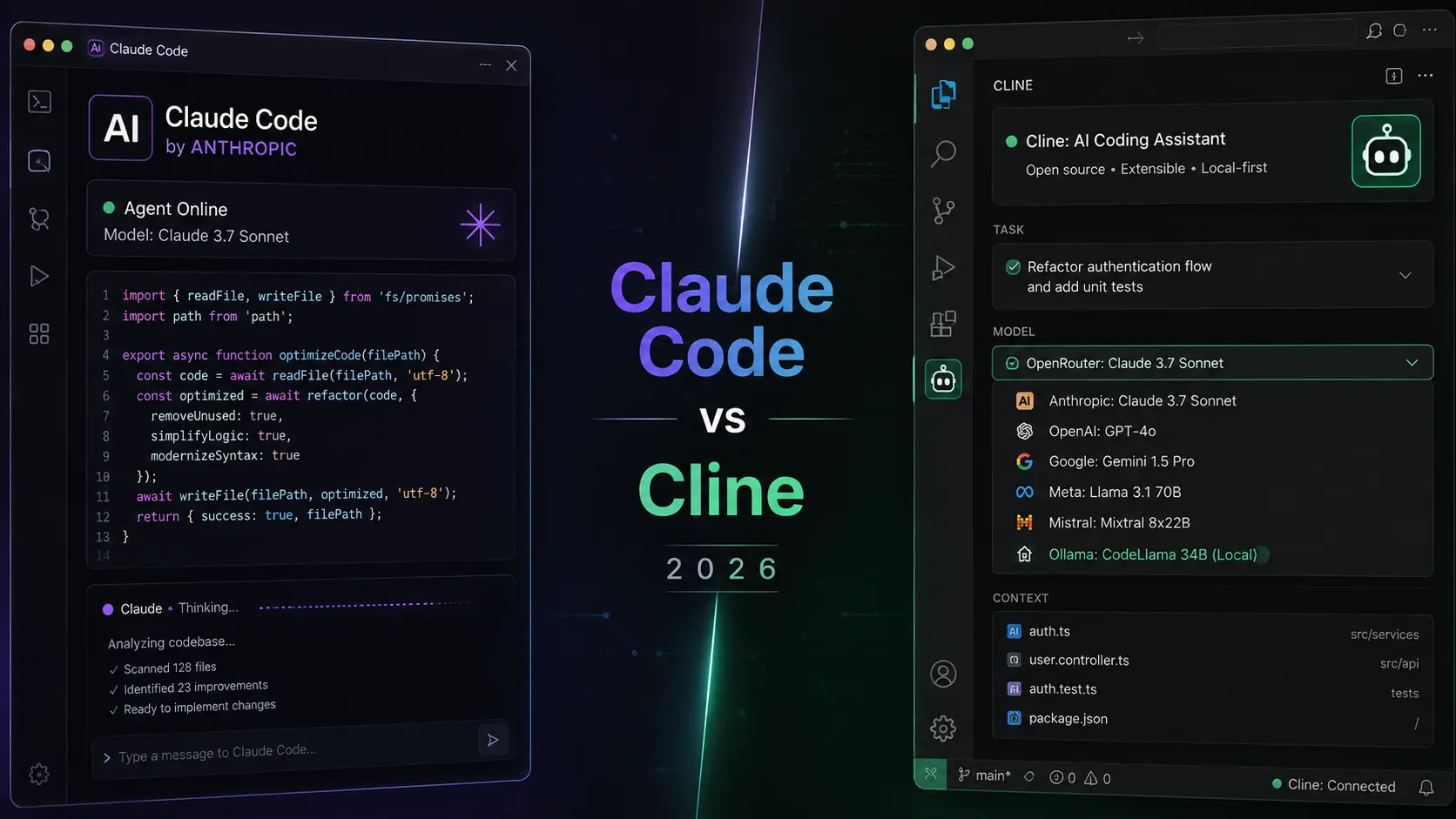
In 2026, "Claude Code or Cline?" has become as common a question in developer circles as "tabs or spaces" once was. Both are agentic coding tools that go far beyond autocomplete — they read your codebase, write and edit files directly, run your test suite, and work through multi-step tasks with minimal hand-holding. But they are built on almost opposite philosophies: one is a polished, single-vendor subscription product; the other is a free, open-source, bring-your-own-model extension. Picking the wrong one for your situation means either overpaying or fighting your tools.
This guide breaks down exactly how Claude Code and Cline differ — pricing, supported models, IDE and platform coverage, autonomy and safety controls, and enterprise readiness — so you can pick the one (or the combination) that actually fits how you build software.
$0
Cline's own price tag — you only pay for the model tokens you use
$20–$200/mo
Claude Code's Pro-to-Max 20x subscription range, bundled with Claude.ai usage
60,000+
GitHub stars on Cline's open-source repository
12+
LLM providers Cline can connect to, from Claude to local Ollama models
1
Model family Claude Code runs on — Anthropic's own Claude models, exclusively
What Is Claude Code?
Claude Code is Anthropic's official agentic coding tool, built to read an entire codebase, plan a change, and then execute it directly — writing files, running commands, and iterating until the task is done.
It ships across more surfaces than most competitors: a terminal CLI, a desktop app, extensions for VS Code and JetBrains, a web version, and even a Slack integration for triggering agent runs from a channel. Under the hood it runs exclusively on Anthropic's Claude models, which gives it tight integration with features like large context windows, prompt caching, and Anthropic's own Model Context Protocol (MCP) for connecting to GitHub, databases, browsers, and other tools.
If you liked this sectionOpen WebUI: The Missing Interface for Local AI- Ships in the terminal, a desktop app, VS Code, JetBrains, the web, and Slack
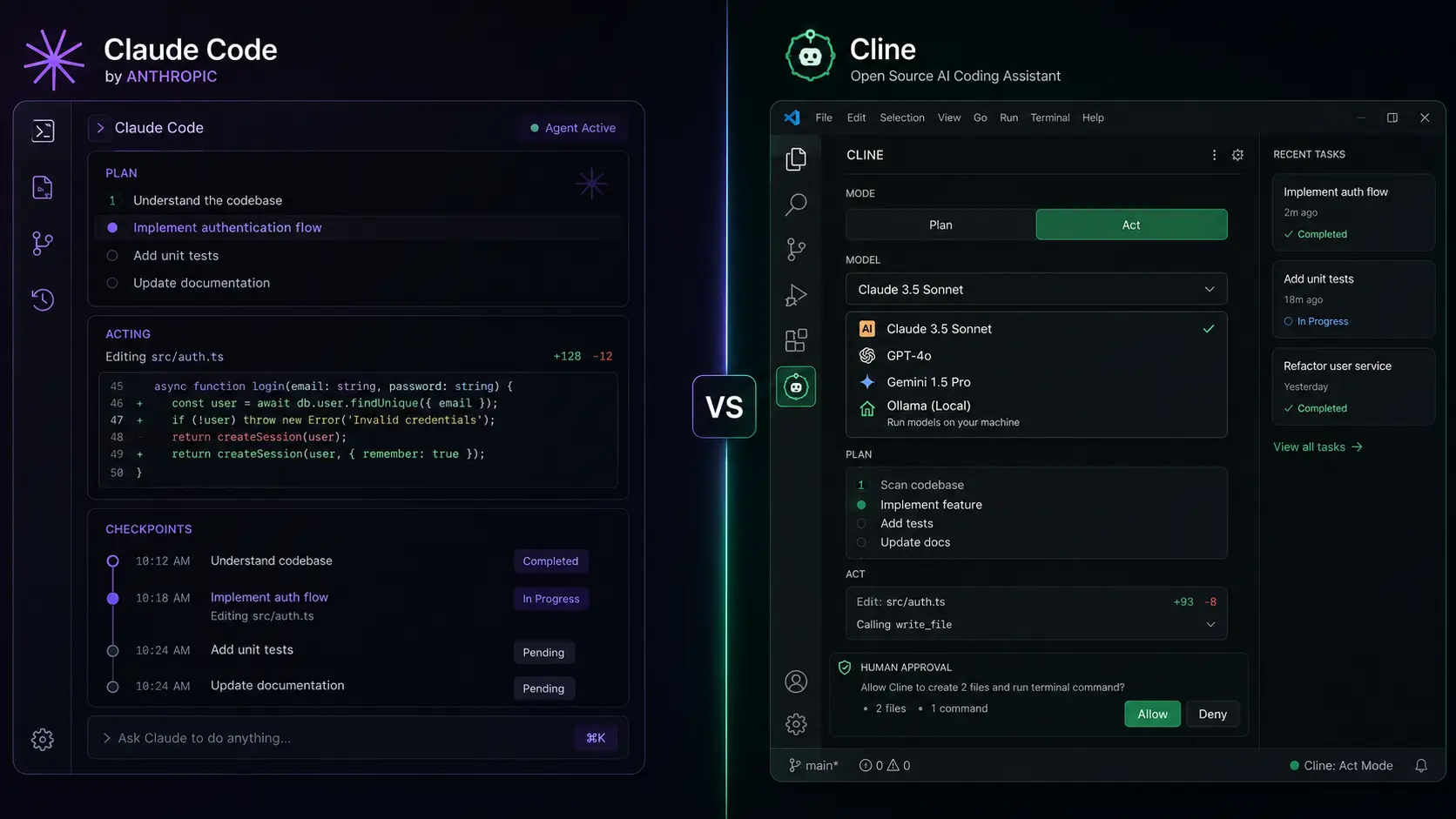
- Plan Mode — Claude proposes an approach and lets you review it before touching any files
- Checkpoints — automatic snapshots before changes, so you can rewind with a keystroke if something breaks
- Native MCP and plugin support — bundle skills, commands, subagents, and hooks into one install
- Subagents — spin off parallel, focused agents for larger multi-part tasks
- Runs exclusively on Anthropic's Claude models, bundled into a Claude Pro or Max subscription
Claude Code — Official Product Page
See current features, supported platforms, and how to install Claude Code directly from Anthropic.
Visit Claude CodeWhat Is Cline?
Cline started life as an extension called "Claude Dev" and has grown into one of the most widely adopted open-source coding agents around — free, model-agnostic, and built to run wherever you already work.
Cline is Apache-2.0 licensed and completely free; you bring your own API key and pay only for the model inference you use. It runs as a VS Code extension (its original home), a JetBrains plugin, a standalone terminal CLI, a Kanban board for orchestrating multiple agents in parallel, and an embeddable SDK for teams building their own tools on top of it. Because it is model-agnostic, you can point it at Claude, GPT, Gemini, DeepSeek, or a fully local Ollama model — including switching models mid-project, or using a cheaper model for planning and a stronger one for execution.
- Free and open source (Apache-2.0), with a large, active community
- Bring-your-own-key: connect Claude, GPT, Gemini, DeepSeek, or a fully local Ollama model
- Plan Mode / Act Mode — review the proposed plan before any file is touched, then approve execution
- Ships as a VS Code and JetBrains extension, a terminal CLI, a Kanban board, and an embeddable SDK
- Human-in-the-loop approval on file edits and terminal commands by default
- Built-in spend-limit controls so a runaway agent can't quietly drain your API budget
Cline: The Open-Source AI Coding Agent
Our full breakdown of how Cline works, recommended models, and why developers are adopting it.
Read the Cline GuideCline — Official Website
Install instructions, supported providers, and the open-source repository straight from the Cline team.
Visit cline.bot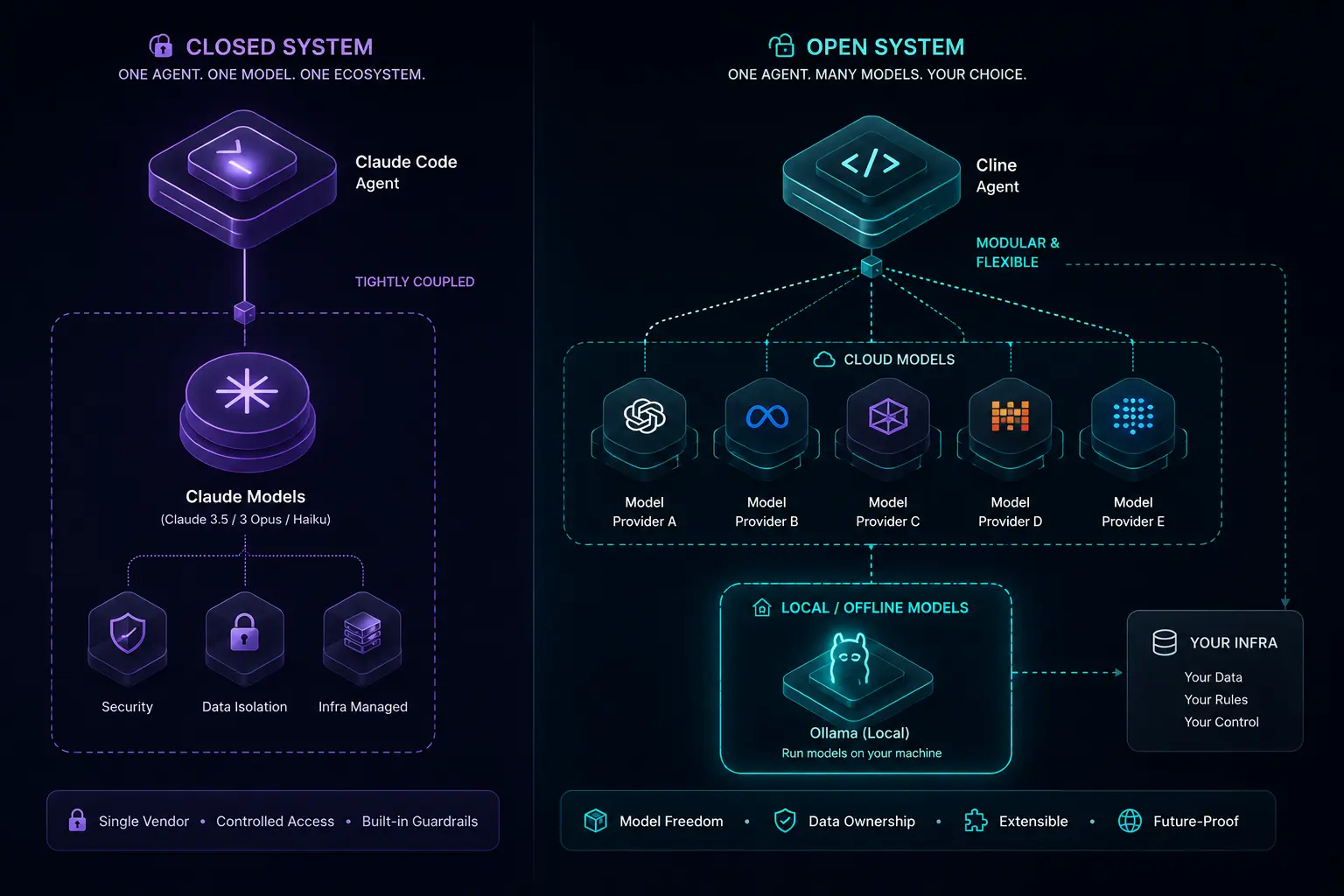
Claude Code vs Cline: Head-to-Head
Pricing and Cost Model
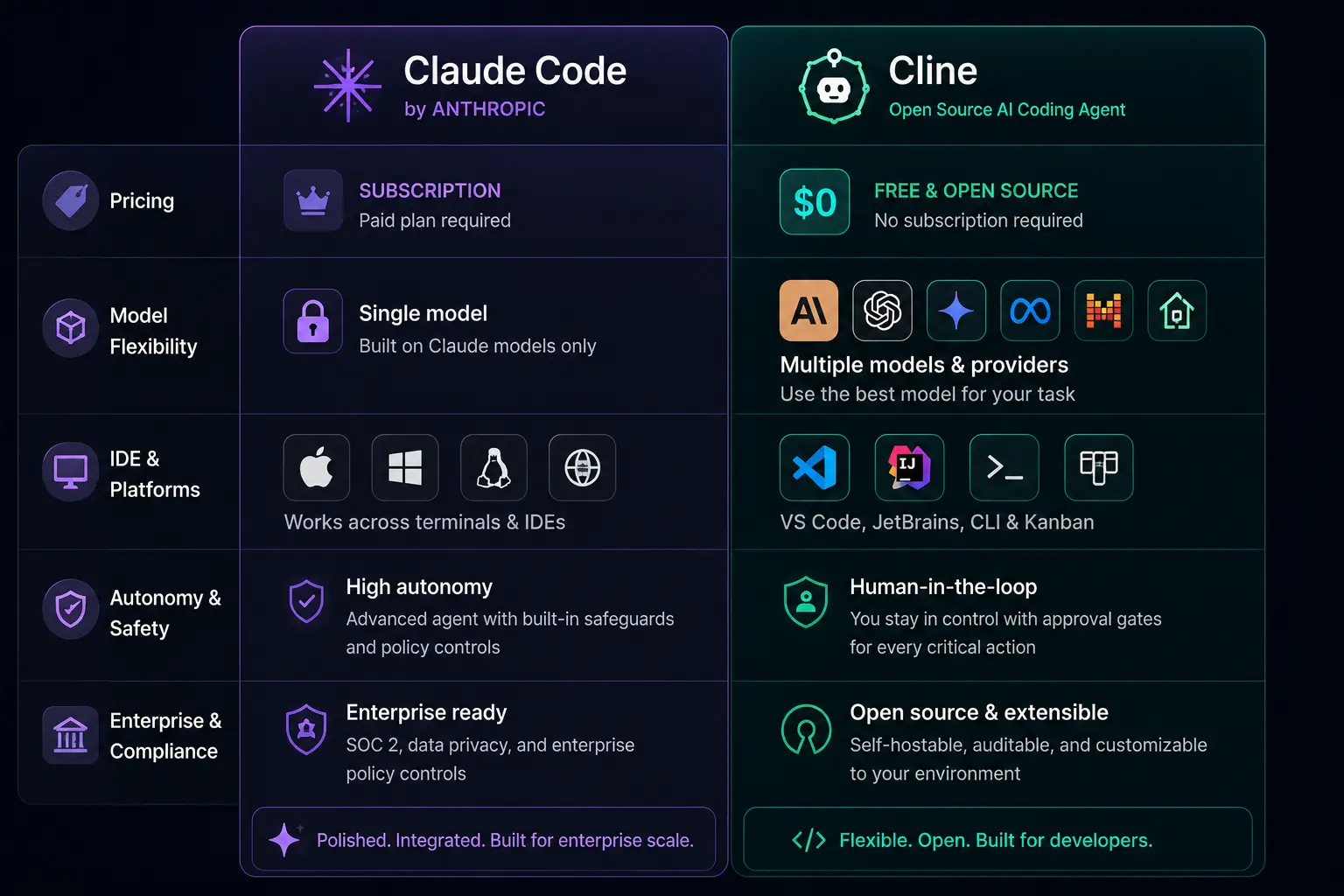
Claude Code isn't priced as a standalone product — it's bundled into a Claude subscription. Pro runs $20/month (or roughly $17/month billed annually) and covers light-to-moderate use; Max 5x is $100/month and Max 20x is $200/month for heavier workloads. Team plans require Premium seats at $100/seat/month with a five-seat minimum, and Enterprise pricing is negotiated directly with Anthropic. Because Claude Code shares its token budget with regular Claude.ai chat usage, a rolling 5-hour session window and a weekly cap both apply.
Cline itself costs nothing. You pay only for the model inference you actually use, through whichever provider you connect — Anthropic, OpenAI, Google, DeepSeek, OpenRouter, and others — or you pay nothing at all by running a local Ollama model. Cline also offers an Enterprise tier for centralized billing and governance at organizations that want that layer without giving up model flexibility.
Model Flexibility
Claude Code runs exclusively on Anthropic's Claude models. That's a deliberate trade-off: you get deep integration between the agent and the model it was designed around, but no option to swap in a different vendor's model for a specific task.
Cline is model-agnostic by design, with support for a dozen-plus providers. You can use Claude for the toughest reasoning, a cheaper open-weight model for routine edits, or a fully local model through Ollama when the code can't leave your machine at all. That flexibility is Cline's single biggest structural advantage over Claude Code.
IDE and Platform Coverage
Claude Code covers the terminal, a desktop app, VS Code, JetBrains, the web, and Slack — a broad, officially maintained surface. Cline covers VS Code (its original home) and JetBrains too, plus a standalone terminal CLI, a Kanban board for running several agents in parallel across worktrees, and an SDK for embedding the same engine into custom tools. Cline's open-source codebase has also been forked into other well-known agents, including Roo Code and Kilo Code, extending its reach further.
Autonomy, Control, and Safety
Both tools default to asking before making changes, but the mechanics differ. Claude Code offers Plan Mode for reviewing an approach up front, automatic checkpoints so you can rewind with a keystroke, granular permission modes, and an Auto Mode research preview that runs a separate safety classifier over each action before it executes.
Cline splits work into Plan Mode and Act Mode: you approve the plan first, then Cline executes it with human approval at each file edit and terminal command by default. It also ships a dedicated spend-limit interface, letting you cap daily or monthly spend so an agent loop can't run away with your API budget.
Enterprise and Compliance
Claude Code's Enterprise tier (through a Claude Enterprise plan) adds a much larger context window, HIPAA readiness, SSO, and custom data retention terms — the kind of paperwork regulated industries usually need. Cline Enterprise adds OIDC, SCIM provisioning, and air-gapped deployment options, but as of mid-2026 it does not carry third-party certifications like SOC 2, HIPAA, or ISO 27001 on any tier. That's worth flagging directly to your compliance team before standardizing on it in a regulated environment.
Which One Should You Actually Choose?
- Choose Claude Code if you're already on a Claude Pro or Max plan, want the most polished out-of-the-box experience, and like having plan mode, checkpoints, and MCP tightly integrated in one product.
- Choose Cline if you want zero licensing cost, the freedom to switch models per task, or the ability to run coding agents fully offline against a local model for maximum privacy.
- Choose Cline if you live in VS Code or JetBrains already and want agentic coding without adding a new subscription on top of your existing tools.
- Choose Claude Code if you want official support, a single vendor to troubleshoot with, and the largest context windows Anthropic offers on Enterprise plans.
- Consider running both: many teams use Claude Code for deep, interactive sessions and Cline for cost-sensitive CI/CD automation or privacy-constrained projects run on local models.
If privacy is your primary driver rather than cost, Cline's ability to run entirely against a local Ollama model is worth a closer look — it's the same open-source stack we cover in our local AI guides.
Ollama: The Engine Behind Local AI
Pair Cline with a fully offline model using Ollama — installation, model picks, and real-world performance.
Read the Ollama GuideYour AI Tools Are Spying on You. Here's the Fix.
The broader privacy case for local inference — and how to build a fully private AI stack, coding agents included.
Read the Privacy Guide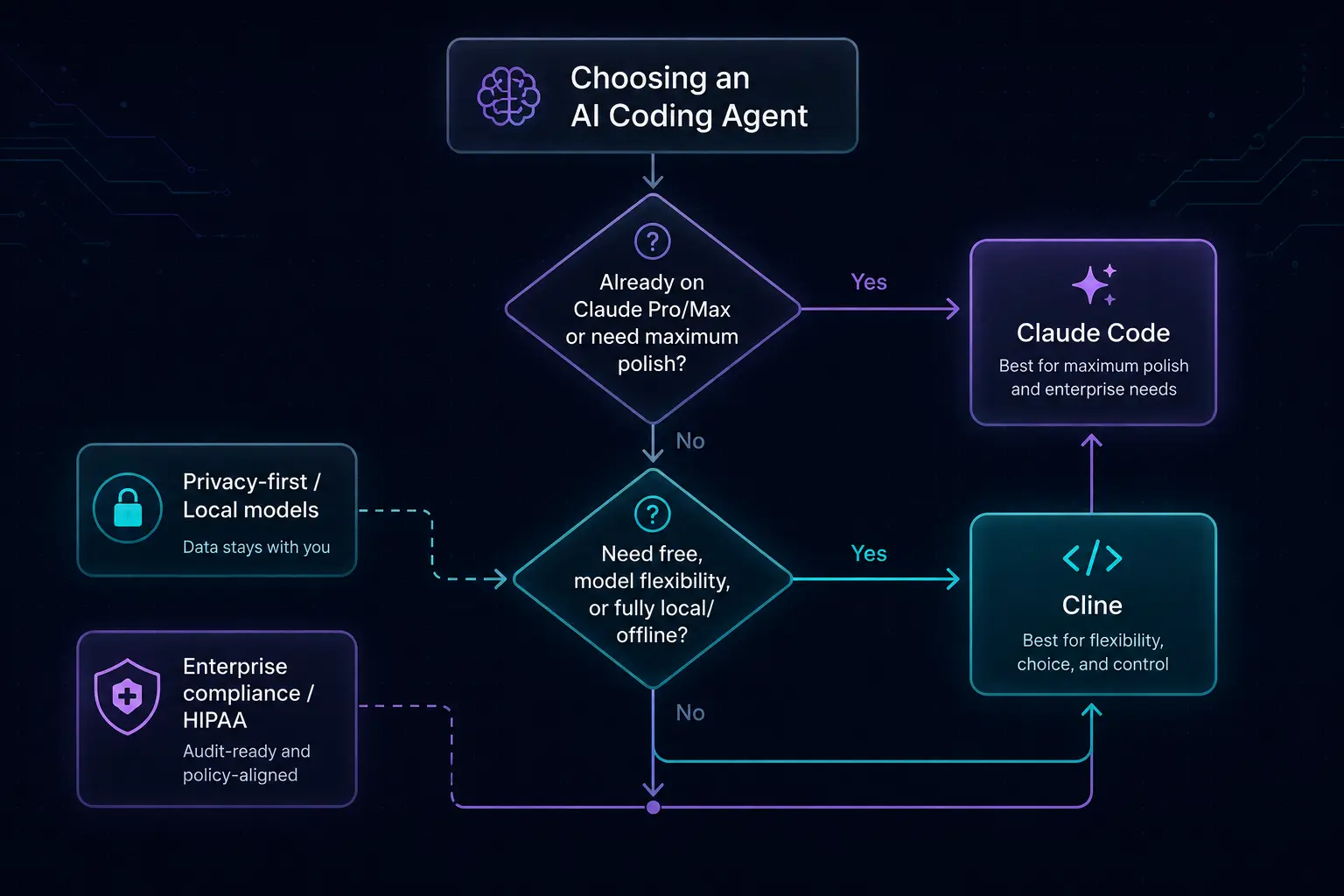
Conclusion: Two Strong Answers to the Same Problem
Claude Code and Cline aren't really competing on capability alone — they're competing on philosophy: an integrated, single-vendor product versus a free, open, bring-your-own-model layer.
If you want the most cohesive experience and already value Claude, Claude Code is the straightforward choice. If you want maximum flexibility, zero licensing cost, or a private, fully local setup, Cline is hard to beat. Plenty of developers in 2026 end up using both, matching the tool to the task rather than picking a single winner.
Whichever you start with, both tools are moving fast — check their official changelogs before committing a whole team to one workflow.
(Frequently asked questions)
Is Cline really free to use?
Yes. Cline itself is free and open source under the Apache-2.0 license. Your only cost is the inference you consume from whichever model provider you connect — or nothing at all if you run a local Ollama model.
Can Cline use Claude models?
Yes. Cline is model-agnostic and supports Anthropic's Claude models alongside OpenAI, Google Gemini, DeepSeek, and a dozen-plus other providers, including local models through Ollama.
Does Claude Code work outside the terminal?
Yes. Beyond the terminal CLI, Claude Code ships as a desktop app, extensions for VS Code and JetBrains, a web version, and a Slack integration.
Which one is better for enterprise teams?
It depends on your compliance requirements. Claude Code's Enterprise tier offers HIPAA readiness and a larger context window through Anthropic. Cline Enterprise offers OIDC, SCIM, and air-gapped deployment, but does not currently hold SOC 2, HIPAA, or ISO 27001 certifications, so regulated teams should check with their compliance function first.
Can I run Cline fully offline?
Yes. Point Cline at a local Ollama instance and inference happens entirely on your own machine, with no code or prompts sent to a third-party API.
Does Claude Code support MCP (Model Context Protocol)?
Yes. Claude Code has native MCP support for connecting to tools like GitHub, databases, and browsers, along with a plugin system for bundling skills, commands, and subagents.
What's the real cost difference between the two?
Claude Code's subscription ($20–$200/month) includes model access and support, while Cline is free but bills you directly for model inference. For light, occasional use Claude Code's flat fee can be simpler; for variable or high-volume use, Cline lets you shop for the cheapest model that gets the job done — including free local models.