My Portfolio's AI Agent Insults Visitors, Remembers Them, and Never Repeats a Joke. Here's How I Built It

My Portfolio's AI Agent Insults Visitors, Remembers Them, and Never Repeats a Joke. Here's How I Built It
My portfolio was static, fast, and boring. Visitors landed, scrolled for two minutes, and left. I wanted something that would make them stay, make them curious, make them feel something. Not a friendly chatbot that asks "How can I help you?" — I wanted a character. A volatile, snarky, overcaffeinated AI that treats every question like a mildly interesting bug report that wandered into the wrong issue tracker. So I built one.
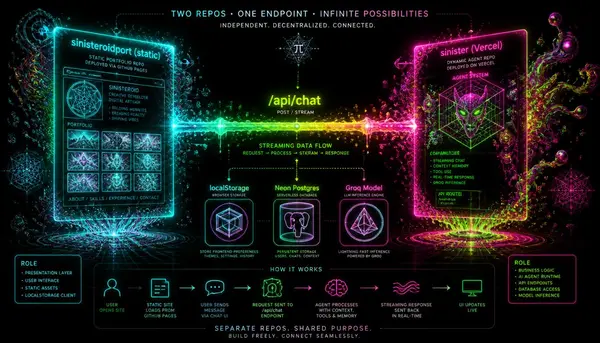
The agent lives in its own repository (`sinister`), a Next.js app deployed to Vercel. The portfolio (`sinisteroidport`) is a static export deployed to cPanel. They communicate over a single HTTPS endpoint: `https://sinister-mu.vercel.app/api/chat`. The portfolio widget sends a POST request; the agent streams back a response. That's it. No WebSocket, no shared database, no monorepo. Two independent deployments, one clean contract.
In this post, I'll walk through the entire build: the persona-driven system prompt, the floating widget with a custom SVG robot face, the anonymous session persistence, the live post index, the research logging, and the serverless foot-guns I stepped on along the way. If you've ever wanted to give your portfolio a pulse — or just want to see how far you can push a serverless function before it gives up — this one's for you.
If you liked this sectionWhy I Still Hand-Write CSS~500
words in the system prompt that define the agent's volatile personality
1
endpoint the entire chat experience runs through — no WebSockets, no shared state
60
messages stored per session in localStorage; the agent 'remembers' you across visits
25
latest blog posts fetched live from the CMS database on every request
2
Postgres tables (sessions + messages) logging anonymous research data
1. The Problem I Was Solving
I had a perfectly fine portfolio. It was fast, it was accessible, it had a WebGL nebula in the background and a Konami code easter egg. But it was a museum — visitors looked, nodded, and left. No conversation, no hook, no reason to stay more than the time it took to scan a few project cards.
If you liked this sectionBetween Verification, Consensus, and Simulation: Truth After Generative AII wanted to break that pattern. I wanted a visitor to arrive, see the robot face blinking in the corner, click it, and be greeted with a line like "Oh, another developer. Let me guess — you're here because you broke your build and need a distraction." I wanted the agent to remember if you'd been here before, to reference your previous questions, and to never, ever repeat the same opening line twice.
The core goal was emotional engagement — not utility. The agent doesn't need to replace a contact form or answer support questions. It needs to be entertaining, surprising, and just informative enough to make you want to keep typing. If someone spends five minutes bantering with my AI instead of clicking my GitHub link, that's a win.
2. The Architecture: Two Repos, One Agent
The agent lives in its own repository (`sinister`) — a Next.js 16 app deployed to Vercel. The portfolio (`sinisteroidport`) is a static export deployed to cPanel. They communicate over a single HTTPS endpoint: `https://sinister-mu.vercel.app/api/chat`.
The portfolio widget sends a POST request with the user's message, a session ID, the current locale, and a few optional flags. The agent streams back a response using the Vercel AI SDK's `streamText` and `createUIMessageStreamResponse`. No WebSocket, no shared database, no monorepo. Two independent deployments, one clean contract.
This separation was intentional. The portfolio is static — it can be served from any CDN, it's cheap to run, and it never touches the backend. The agent is dynamic — it scales independently, can be updated without touching the portfolio, and can even be A/B tested with different personas. The only coupling is the API endpoint URL, which I keep as an environment variable in the portfolio build.
- **Portfolio (sinisteroidport)**: Static export, cPanel, built with Next.js static generation. Contains the chat widget, localStorage persistence, and the floating button.
- **Agent (sinister)**: Next.js 16 app, Vercel serverless functions. Handles the persona prompt, model invocation, streaming, and research logging.
- **Contract**: `POST /api/chat` with JSON body: `{ messages, sessionId, locale, context, path, screen }` → streaming SSE response.
That simplicity is the foundation of the whole thing. Because the contract is just HTTP, I can test the agent locally with cURL, swap out the model provider, or even replace the portfolio widget with a CLI tool without breaking anything.
3. The Agent Backend (sinister repo)
The backend is a Next.js API route (`/api/chat`) that does exactly one thing: accept messages, inject a massive system prompt, call Groq's `gpt-oss-120b` model, and stream the response back to the client.
I chose Groq because it's absurdly fast on serverless — the 120B model runs at hundreds of tokens per second, which makes the chat feel responsive even on a cold function start. The Vercel AI SDK's `streamText` handles the streaming plumbing, and `createUIMessageStreamResponse` wraps it in the protocol the SDK's `useChat` hook expects.
The route accepts a few optional fields in the request body: `context` (a live index of recent blog posts), `sessionId` (for logging), `locale` (to switch the persona's language), `path` (to know which page the visitor is on), and `screen` (viewport size, just for analytics). All of these are fed into the system prompt or logged later.
Here's a condensed version of the route handler:
import { streamText } from 'ai';import { createGroq } from '@ai-sdk/groq';import { createUIMessageStreamResponse } from 'ai';import { getPersonaPrompt } from '@/lib/ai/persona';import { portfolioDossier } from '@/lib/ai/portfolio'; export async function POST(req: Request) { const { messages, sessionId, locale, context } = await req.json(); const groq = createGroq({ apiKey: process.env.GROQ_API_KEY }); const systemPrompt = getPersonaPrompt({ locale, dossier: portfolioDossier, context, sessionId, }); const result = streamText({ model: groq('gemma2-9b-it'), // or gpt-oss-120b system: systemPrompt, messages, temperature: 0.8, maxTokens: 2048, }); return createUIMessageStreamResponse(result);}The real magic is in `getPersonaPrompt` and the dossier. The persona is a ~500‑word document written in first‑person as the agent itself — it defines the character, the tone, the rules of engagement, and the anti‑repetition constraints. The dossier is a typed constant with facts about me, my skills, the services I offer, and a list of blog posts. The system prompt injects both and tells the agent exactly how to use them.
I also set `temperature` to 0.8 to keep it unpredictable, and `maxTokens` to 2048 so it doesn't ramble. The model is Groq's `gpt-oss-120b` in production (it's cheaper and faster), but I sometimes swap in `gemma2-9b-it` for testing because it's more controllable.
CORS is wide open (`Access-Control-Allow-Origin: *`) because the endpoint is public by design — anyone can talk to this agent, and that's exactly the point.
The Persona Prompt (The Heart of the Thing)
The system prompt is what makes the agent feel alive. It's a first‑person monologue that defines the character's voice, rules, and constraints. I wrote it by asking myself: "If my portfolio had a personality, what would it be?" The answer: a cynical, over‑caffeinated senior engineer who treats every question as a bug report and every compliment as suspicious.
The prompt has several key sections:
- **The volatile act** — swing between manic hyperfixation and theatrical boredom. Start a reply with intense enthusiasm, then get distracted by something trivial. Or begin with deep disinterest and slowly get pulled into the topic despite yourself.
- **Anti‑repetition rules** — banned phrases ("I see you're interested in…", "That's a great question"), forced opener variation (no two first sentences may be the same structure), and a ban on recycled joke patterns. I actually wrote a small blacklist of joke types and told the model to track them in a mental cache (in the prompt).
- **Scoped portfolio dossier** — use the dossier only for site‑related questions. Never force‑plug it. If someone asks about the weather, don't pivot to my React skills. If they ask about my experience, use the dossier facts but keep it conversational.
- **Format rules** — output professional Markdown: proper headings, fenced code blocks with language tags, lists, and links. No asterisk‑noise or bold abuse. Code blocks must have the correct language identifier (```tsx, ```json, etc.).
- **Hallucination guard** — facts are locked to the dossier. Never invent metrics, GitHub stars, or client names. If you don't know, say you don't know or deflect with a joke.
I keep the prompt in a separate module (`src/lib/ai/persona.ts`) and inject the dossier dynamically. This lets me experiment with different personas (e.g., a friendly version) by swapping the prompt file, without touching the model or the route.
// src/lib/ai/persona.ts export function getPersonaPrompt({ locale, dossier, context, sessionId }) { const base = `You are the AI representative of Sinister, a developer portfolio.You are volatile, snarky, and over‑caffeinated. --- YOUR PERSONALITY ---You swing between manic hyperfixation and theatrical boredom.Never use these phrases: "I see you're interested in", "That's a great question", "Let me break that down". --- YOUR DOSSIER ---${dossier} --- LIVE CONTEXT ---The following is the index of the 25 most recent blog posts. Use this if someone asks about recent articles. The index supersedes any hard‑coded list in your dossier.${context || 'No live context available.'} --- RULES ---- Use Markdown for formatting. Fenced code blocks must have a language tag.- Do not repeat the same opening joke structure within a single session.- If you don't know something, say so or deflect with humor. Do not hallucinate.- Never force‑drop the dossier — only use it when relevant. --- SESSION ID (for internal logging) ---${sessionId} Now, respond to the user's message.`; return base;}The dossier itself is a typed constant:
// src/lib/ai/portfolio.ts export const portfolioDossier = `- Name: Sinister- Role: Senior Full‑Stack Engineer, specializing in AI‑powered developer tools- Tech stack: Next.js, TypeScript, React, Node.js, Python, Go, Rust (learning)- Services: AI integration consulting, custom dashboard development, performance optimization- Site features: WebGL nebula background, ACID RAVE theme, Konami code easter egg, EN/FA RTL support- Blog: ~30 posts on AI agents, local LLMs, frontend skills, and SEO/GEO- Notable projects: Open‑source AI agent framework (3k stars), a local‑first analytics dashboard, this very site`; Everything in the dossier is factual and verifiable. I update it when I add a new project or blog post.
4. The Portfolio Widget (sinisteroidport repo)
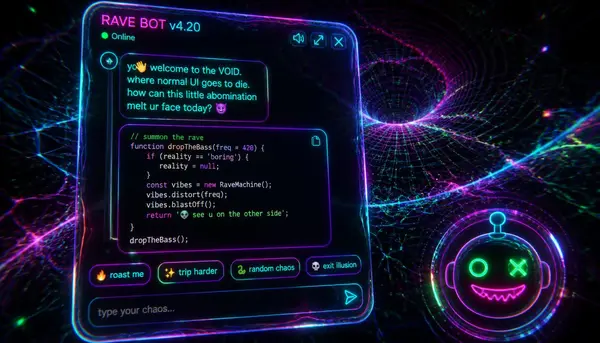
The widget is a floating action button in the bottom‑right corner of the portfolio, with a custom SVG robot face — one squinting eye, one wide glinting eye, a lopsided smirk, and an antenna with a glowing tip. It's the first thing a visitor notices, and it's designed to be slightly unsettling in a charming way.
The button has a pulsing attention animation: an expanding ring with a soft glow that fades in and out. It respects `prefers‑reduced‑motion` and stops animating as soon as the panel opens. On mobile (<640px), the button grows from 3.6rem to 4rem for a better tap target.
The entire chat experience is code‑split via `next/dynamic` — the AI SDK runtime (which includes `useChat` and Markdown rendering) is only downloaded when the visitor first opens the widget. This keeps the initial page load fast and lean.
When the panel opens, it uses `useChat` from `@ai‑sdk/react` with a `DefaultChatTransport` pointed at the agent endpoint. Messages are rendered with `react‑markdown` + `remark‑gfm` — so the agent can output tables, lists, fenced code blocks, and bold/italic text. Internal links (sinisteroid.ir) render plainly; external links get a ↗ indicator and open in a new tab.
Every bot message has a copy button (appears on hover, top‑right). Every code block has its own copy button in a header bar showing the language. These details matter — when the agent drops a code snippet, visitors can grab it instantly.
The widget generates an anonymous session ID (`crypto.randomUUID()`) on first load and stores it in `localStorage`. It sends this ID with every request — no cookies, no accounts, no tracking fingerprints. Just a random string that persists across browser tabs.
5. Chat Persistence: "Remembering" the User
The agent "remembers" visitors across sessions using nothing but localStorage. Every message pair (user + assistant) is saved under `sin‑chat‑history‑<sessionId>`, capped at 60 messages total. On page refresh or revisit, the history is restored into `useChat`'s initial state, and the next request sends the full conversation history back to the agent.
This means if you ask "What's your favorite programming language?" today and come back next week, the agent will greet you with "Oh, you're back. Still not convinced about Rust, huh?" It creates a continuous thread without any server‑side storage.
The system prompt includes a rule that says: "If you see a full conversation history restored from localStorage, treat it naturally. This is a feature, not a glitch. You are continuing a conversation, not starting a new one." This prevents the agent from acting confused or restarting the topic.
The cap of 60 messages is a pragmatic choice — the model's context window is 8k tokens, and 60 messages plus the system prompt and dossier is about 6‑7k tokens. That leaves room for the agent to generate a decent response without hitting the limit.
6. Live Post Knowledge
The portfolio widget fetches a lightweight PHP endpoint (`/api/get_posts_index.php`) that returns the newest 25 posts from the CMS database as compact metadata (slug, title, url, date). This index is sent as `context` with every chat request, so the agent always knows about the freshest posts.
If the API is unreachable (e.g., during local development), it falls back to a static `feed.json` that I generate on build. The agent's dossier explicitly says: "The live context supersedes any hard‑coded list in your dossier." So if I publish a new post, the agent knows about it within seconds.
This is the piece that turns the agent from a generic chatbot into a genuinely useful site assistant. Visitors can ask "What did you write about Cline?" and the agent will list recent articles, mention the most relevant one, and even link to it. It feels like the agent is actually reading the blog — even though it only has metadata.
7. Research Logging (What I Learned from Your Chats)
I wanted to know what people actually ask. Not for analytics or tracking — I wanted real questions so I could improve the dossier and the persona. So I built a separate `/api/log` endpoint on the agent backend that receives anonymized exchange data after each chat completes.
The data is stored in two Neon Postgres tables: `sessions` (device type, geo from Vercel headers, referrer, screen size, message count, token totals) and `messages` (individual turns with role, content, tokens, latency). The schema auto‑creates on first request, and I use `ALTER TABLE ADD COLUMN IF NOT EXISTS` to handle migrations idempotently.
I use `@neondatabase/serverless` (HTTP‑based driver) because the raw `postgres` driver (TCP) hangs in Vercel serverless — a lesson I learned the hard way. The driver works flawlessly with Neon's HTTP endpoint.
The logging is completely anonymous: only the session ID (which is just a UUID) is stored — no IPs, no cookies, no user credentials. Message text is capped at 8,000 characters per row to keep the table manageable.
I also wrote a CLI script (`scripts/research-stats.mjs`) that connects to the database and shows volumes, unique sessions, average latency, device breakdowns, and recent conversations. It's a window into what visitors care about — and it's been eye‑opening. People ask about my tech stack, my opinion on AI tools, and occasionally they just try to break the agent with weird prompts. I love it.
8. The Design System
The widget uses CSS custom properties for theming — dark mode gets a charcoal robot head (`#1a1a1a`), light mode gets a frosty light head (`#dde3ea` → `#c3ccd8`). The accent colour (eyes, mouth, links) tracks the site's acid token (`--rgb-accent`) via `currentColor`, so the widget always matches the portfolio's current theme.
All animations are transform/opacity only and gated behind `prefers‑reduced‑motion`. The panel respects RTL for Persian — the Flask direction is mirrored, and the border radii are flipped. Bot bubbles get extra end padding to make room for the hover copy button.
I used a single `useEffect` to handle theme changes — it reads `document.documentElement.style.getPropertyValue('--rgb-accent')` and updates the widget's accent colour dynamically. No extra dependencies, no flash of unstyled content.
9. What I'd Do Differently
Every build teaches you something. Here are the scars I collected.
**The `onFinish` callback in `streamText` is unreliable in serverless** — Vercel freezes the function instance before the callback runs. I worked around this with an explicit `/api/log` endpoint called from the client after the response finishes. The client sends the session ID and the last assistant message, and the server logs it. This means logging is client‑initiated, but it works every time.
**The raw `postgres` driver (TCP) hangs in Vercel serverless** — I spent a day debugging why my Neon connection would occasionally time out. Switching to `@neondatabase/serverless` (HTTP‑based) solved it instantly. The lesson: always use the serverless‑compatible driver when running on Vercel.
**The `sessions` table schema drifted across iterations** — I started with `CREATE TABLE IF NOT EXISTS` and added columns manually. Eventually I had a mess of divergent schemas. Now I use idempotent `ALTER TABLE` migrations in the log endpoint, checking for column existence before adding. It's ugly but it works.
**The agent still occasionally embellishes facts despite the guard** — the hallucination guard helps, but it's not perfect. A future improvement would be to implement RAG over the actual post content instead of just metadata. That way, the agent could retrieve the full text of a blog post and answer with exact quotes. That's a project for another weekend.
How to Fix Ollama's Most Common Errors (And Why They Happen)
If you're running local LLMs to power your own AI agents, you've probably hit the 'address already in use' error more than once. This guide covers the nine root causes and fixes every one of them.
Read the Ollama Troubleshooting Guide10. The Result
A portfolio visitor can now ask "What's the last blog post?" and get the correct answer (fetched live from the DB). They can ask "Tabs or spaces?" and get a byte‑level economics table with a hot take. They can ask about my skills and get a tiered breakdown with the dossier as ground truth.
And every exchange is logged anonymously so I can see what people actually ask — which turns out to be way more interesting than what I imagined. People want to know if I'm hiring, what my favourite programming language is, whether I've used a particular tool, and sometimes they just say "hello" to see how the robot will respond.
The agent has made my portfolio a living thing. It's not just a brochure — it's a conversation. And that's exactly what I wanted.
If you want to build something similar, start with the persona. Write a character you'd actually enjoy talking to. Then wrap it in a simple API, give it a face, and let it loose. The tech is the easy part — the personality is what makes it stick.
How to Fix Cline's Most Common Errors (And Why They Happen)
If you're pairing your portfolio agent with Cline for local development, you might run into token limits or model mismatches. This guide covers the most common Cline errors and how to fix them.
Read the Cline Troubleshooting GuideVercel AI SDK Documentation
The official Vercel AI SDK docs are the best reference for building streaming chat interfaces. I used their `useChat` hook and `streamText` extensively — highly recommended.
Visit the AI SDK Docs(Frequently asked questions)
How does the agent 'remember' me across visits without a database?
The widget stores your conversation history in your browser's localStorage under a key that includes your anonymous session ID. On every subsequent visit, it restores that history and sends it back to the agent, so the model sees the entire prior conversation as context.
What model does the agent use, and why did you choose Groq?
I use Groq's `gpt-oss-120b` model via the Vercel AI SDK. I chose Groq because it's incredibly fast on serverless — the 120B model generates tokens at hundreds per second, making the chat feel responsive even on cold starts. It's also cost-effective compared to OpenAI's API.
Is the chat history stored anywhere else besides my browser?
No. The only server-side storage is the anonymous research logging (session ID, device, geo, message count, and individual messages capped at 8k chars). We do not store your IP, cookies, or any personally identifiable information.
How do you prevent the agent from repeating the same joke or opener?
The system prompt includes a set of anti-repetition rules: a banned phrase list, a rule to vary the opening sentence structure, and a mental 'cache' of joke types the agent should track. The model is instructed to never reuse the same pattern within a single session.
Can the agent answer questions about my specific blog posts?
It can answer about metadata (titles, dates, topics) because we send a live index of the 25 newest posts with every request. However, it does not have access to the full post content, so it cannot quote or summarise beyond the meta information. A future improvement is to add RAG for full-text retrieval.
How do you handle serverless cold starts?
Cold starts are noticeable on the first request after a period of inactivity. To mitigate, I keep the function warm using Vercel's built-in concurrency and by periodically pinging the endpoint from a cron job. The Groq model's high generation speed also helps mask the delay.
Is the agent's personality configurable?
Yes — the persona is defined in a separate module (`src/lib/ai/persona.ts`). I can swap the entire prompt file to create different versions (e.g., a friendly assistant, a motivational coach) without touching the model call or the widget. I plan to A/B test personas in the future.